Cross-Section Cubature: A Practical Guide
Cubature is the station-by-station method behind most earthwork quantity tables: cross-sections are cut at regular stations along a centreline or axis, and the cut and fill area at each section is measured against the design. For roads, canals and channels, engineers rarely compute earthwork as a single blob of volume — this section-by-section approach is what they use instead.
Average end area and prismoidal volume calculator
The earthwork volume between two cross-sections a known distance apart. Add the area of the section halfway between them to get the prismoidal volume as well.
Formula: V = L · (A₁ + A₂) / 2 · V = L · (A₁ + 4·Aₘ + A₂) / 6
A₁, A₂: end areas · Aₘ: area halfway between them · L: distance
Average end area is exact only when the area changes linearly between the sections; it overstates where the shape tapers, as in a cone or a pyramid. The prismoidal formula is exact when the section dimensions change linearly along the length.
A real site is rarely this regular. Measure the surveyed surface instead: Cross Section Software
Sections along an alignment
Cubature works by cutting cross-sections at regular stations along a centreline or axis. At each section, the cut area and fill area between the existing ground and the design are measured.
Because the sections are evenly spaced, the method produces a clean, checkable table of quantities rather than one opaque number.
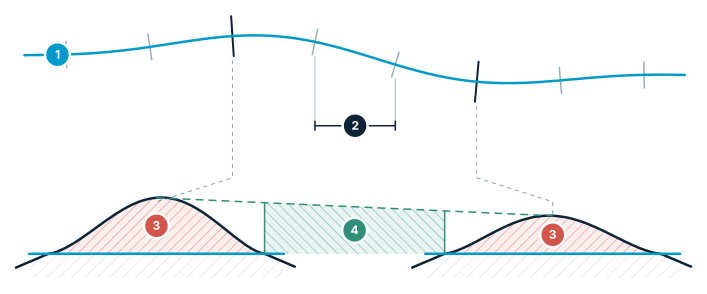
Cross-section cubature
Axis → stations → area per section → volume from areas.
- Axis — the alignment drawn on the terrain
- Station interval (L) — sections are taken at equal spacing
- Section area — cut and fill area measured at each station
- Volume between sections — summed with the average end-area method
From areas to volume
The volume between two neighbouring sections is estimated from their areas and the distance between them — most commonly with the average end-area method, which averages the two section areas and multiplies by the spacing.
Summing these along the alignment gives the total cut and fill.
Why engineers still prefer it
Cubature is transparent and auditable. Anyone can open the station table, check a section, and trace the total. It also produces the section drawings that go straight into a set of construction plans.
Cutting the sections directly from a DEM keeps the ground line honest, so the quantities match the real terrain.
Frequently asked questions
What is cross-section cubature?
Cubature is the station-by-station method behind most earthwork quantity tables: cross-sections are cut at regular stations along a centreline or axis, and at each section the cut area and fill area between the existing ground and the design are measured.
How is volume calculated between two cross-sections?
The volume between two neighbouring sections is estimated from their areas and the distance between them, most commonly using the average end-area method, which averages the two section areas and multiplies by the spacing.
Why do engineers still prefer the cross-section method over a single total volume figure?
Because the sections are evenly spaced, it produces a clean, checkable table of quantities rather than one opaque number, and it also produces the section drawings that go directly into construction plans.
Why is it important to cut sections directly from a DEM?
Cutting the sections directly from a DEM keeps the ground line honest, so the resulting quantities match the real terrain.
What is the prismoidal formula, and when does it differ from average end area?
The prismoidal formula is V = L × (A₁ + 4·Aₘ + A₂) / 6, where Aₘ is the area of the section halfway between the two ends; average end area is V = L × (A₁ + A₂) / 2. Average end area is exact only when the area changes linearly between the sections and overstates where the shape tapers, as in a cone or a pyramid; the prismoidal formula is exact when the section dimensions change linearly along the length. The calculator on this page gives both and the difference.
Sources
Compute cross-section cubature in STREAM
Native Windows · fully offline · free beta