Cut and Fill Explained, with a Calculator
Cut is the volume of material you must remove to reach a target surface; fill is the volume you must add. Together they are the core quantity in earthworks — it sounds simple, but the number depends entirely on what you compare against. This guide explains how cut/fill is calculated and where it commonly goes wrong.
Cut and fill calculator: excavation or fill pad with sloped sides
A rectangular or round excavation, or a fill pad, on level ground. The side slope is the horizontal distance per 1 vertical (1.5 means 1.5:1); 0 is a vertical wall.
Formula: V = a·b·h + m·h²·(a + b) + 4/3·m²·h³
a, b: bottom (fill: top) length and width · h: depth · m: side slope; round: r = bottom radius, R = r + m·h
Assumes level ground and the same slope on every side, with no benches. For an irregular site, or a volume against the real ground, use a surveyed surface.
A real site is rarely this regular. Measure the surveyed surface instead: Cut and Fill Software
What cut and fill means
Cut is the volume of material you must remove to reach a target surface; fill is the volume you must add. Together they describe the earthwork needed to turn the existing ground into the design surface.
The result is usually reported as separate cut and fill volumes, and sometimes as a net balance, because a site that balances cut against fill moves less material off-site.
Cut / Fill — three reference modes
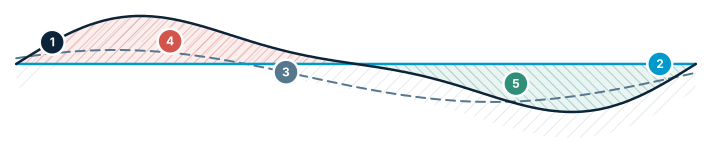
Same terrain, three references → three different volumes. The most confusing point for users.
- Existing terrain — the surveyed surface
- Flat level — a fixed design elevation
- Reference surface — another scenario or design
- Cut — above the reference → removed
- Fill — below the reference → added
The reference surface is everything
The same terrain can give very different cut/fill numbers depending on the reference. Common references are the real existing terrain, a flat design level, or another design surface.
This is why good software lets you choose the reference explicitly. If the reference is ambiguous, the volume is ambiguous.
Comparing two surveys
A related use of cut/fill is comparing two surveys of the same site taken at different times. The difference tells you how much material was added or removed between them — useful for progress tracking and reconciliation.
Common pitfalls
Watch for mismatched extents (the two surfaces must overlap), the wrong reference, and using a surface model where a bare-earth model was needed. Computing directly on a clean DEM, with an explicit reference, avoids most of these.
Frequently asked questions
What is the difference between cut and fill?
Cut is the volume of material you must remove to reach a target surface, and fill is the volume you must add — together they describe the earthwork needed to turn the existing ground into the design surface.
Why do cut and fill volumes depend on which reference surface you use?
The same terrain can produce very different cut/fill numbers depending on what it's compared against (common references are the actual existing terrain, a flat design level, or another design surface), so an ambiguous reference produces an ambiguous volume — which is why good software lets you choose the reference explicitly.
Can cut and fill calculations be used to compare two surveys over time?
Yes — comparing two surveys of the same site taken at different times shows how much material was added or removed between them, which is useful for progress tracking and reconciliation.
What are common mistakes when calculating cut and fill?
Common pitfalls are mismatched extents where the two surfaces don't fully overlap, using the wrong reference surface, and using a surface model where a bare-earth model was actually needed; computing directly on a clean DEM with an explicit reference avoids most of these errors.
How do you calculate the volume of an excavation with sloped sides?
On level ground, with a bottom a × b, a depth h and a side slope of m horizontal per 1 vertical: V = a·b·h + m·h²·(a + b) + 4/3·m²·h³. The opening at ground level is (a + 2mh) × (b + 2mh). A working space on each side widens the bottom before the formula is applied, and a fill pad uses the same formula with its top as a × b. The calculator on this page does the arithmetic; for uneven ground, compute against a surveyed surface instead.
Compute cut and fill in STREAM
Native Windows · fully offline · free beta