BLAST PATTERN DESIGN SOFTWARE
Blast Pattern Design Software for Bench Drilling
STREAM lays out a drill pattern on a bench you have surveyed. You set burden, spacing and the rest of the geometry; STREAM reads each collar elevation from the DEM, works out depth and inclined length, checks the pattern against the free face in three dimensions, and gives you the hole table, drawings and a report.
What is a blast pattern?
A blast pattern is the layout of blastholes on a bench: how far each row sits from the one in front of it (burden), how far apart the holes are within a row (spacing), and how the grid is placed relative to the free face.
The geometry decides the result. Too much burden in front of a hole and the rock does not move; too little and it throws. Because the bench surface is never flat, the depth of every hole depends on the ground above it — which is exactly what a terrain model can tell you.
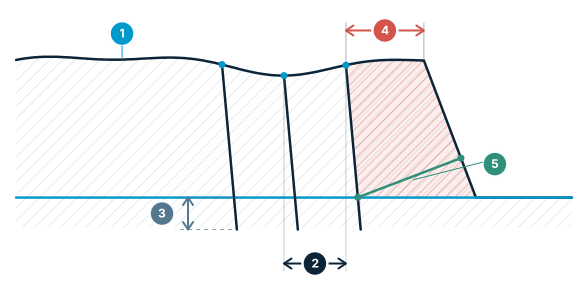
Burden and spacing — plan burden is not the burden
Hole depth comes from the bench surface, and the rock actually standing in front of a hole differs from the plan distance.
- Collar elevation — each collar read from the DEM — a bench top is never flat
- Burden between rows — distance from the front row to the row behind it
- Subdrill — the extra depth below the floor level
- Plan burden — horizontal distance to the crest — misleading on a battered face
- True burden — measured at floor level, perpendicular to the hole axis
Blast Pattern Design Software in STREAM
Pattern on a real bench
Draw the block boundary and the face line, then set staggered or square layout, burden, spacing, front offset and grid rotation. The row nearest the face follows the face line rather than the grid, so the front burden stays even along an irregular crest.
Depths from the terrain
Each collar elevation is read from the DEM and the design floor can be derived from the surveyed ground, so hole depth and inclined length follow the real bench instead of an assumed flat top.
Burden relief in three dimensions
Plan distance to the crest is not the same as the rock actually standing in front of a hole. STREAM measures the relief along the hole axis at every elevation, which is where an inclined hole on a battered face gets tight.
Compare against as-drilled
Load the collars the crew actually drilled and STREAM reports the difference against the design. Measured values are kept separate — they never overwrite the design, so you can see the deviation instead of losing it.
Volume, tonnage and hole table
Get the blasted volume and tonnage for the block, and a hole-by-hole table with collar, depth and length, exported to Excel or CSV with the same row lettering used in the drawings.
Geometric checks
Holes too close to the block edge, depth or burden outside the range you set, and the other geometric conditions are flagged with the value and the limit before anything is drilled.
How to lay out a blast pattern in STREAM
- 1
Draw the block and the face
Outline the block to be blasted on the surveyed bench and draw the face line along the crest.
- 2
Set the pattern geometry
Choose a square or staggered layout and enter burden, spacing, front offset and grid rotation. The row nearest the face follows the face line rather than the grid.
- 3
Set depth and subdrill
Each collar elevation is read from the DEM and the floor can be derived from the surveyed ground; add the subdrill and the hole angle to get depth and inclined length per hole.
- 4
Check the geometry
Review holes too close to the block edge, depth or burden outside your range, and the relief measured along the hole axis against the free face.
- 5
Export the hole table
Send the hole-by-hole table with collar, depth and length to Excel or CSV, the pattern plan and bench section to DXF, and the report to PDF.
- 6
Compare against as-drilled
After drilling, load the collars the crew actually drilled; the measured values stay separate from the design so the deviation is reported rather than lost.
Supported formats
Frequently asked questions
What does STREAM's blast pattern module do?
It lays out a drill pattern on a surveyed bench, takes each collar elevation from the DEM, computes hole depth and inclined length, checks the geometry including burden relief against the free face, and exports the hole table, drawings and a report.
Does STREAM design the charge and the delay timing?
No. The module covers pattern geometry and hole elevations only. Explosive charge design, initiation and delay timing, vibration prediction and fragmentation modelling are outside its scope and remain the blasting engineer's responsibility.
How are hole depths calculated?
The collar elevation of every hole is read from your terrain model and the design floor can be derived from the surveyed ground. Depth is the collar elevation minus the floor plus the subdrill you set, and the inclined length follows from the hole angle.
What is burden relief and why measure it in 3D?
Burden relief is the rock standing between a hole and the free face. Measured on plan it is just the horizontal distance to the crest, but an inclined hole behind a battered face has a different amount of rock in front of it at every elevation — STREAM measures it along the hole axis.
Can I compare the drilled holes against the design?
Yes. You can load the as-drilled collars and STREAM reports the deviation from the design pattern. The measured data is kept separate from the design so the difference stays visible.
Where this is used
Try Blast Pattern Design in STREAM
Free beta for Windows x64. Works fully offline with GeoTIFF, LAS/LAZ and DXF.
Download STREAM free