ORTHOMOSAICComing soon
Orthomosaic Software: Turn Drone Photos into a Georeferenced Orthophoto
Stream Capture is orthomosaic software for drone surveys. Point it at a folder of photos and it aligns them, builds the surface and mosaics a true orthophoto in GeoTIFF — on your own computer, with nothing uploaded. The orthophoto is written on the same pixel grid as the DSM and DTM, so everything overlays in GIS without resampling.
Stream Capture is in development and not released yet. At launch it will come in the same download as its sister program Stream Terrain; today's download contains Stream Terrain.
What is an orthomosaic, and how is it different from an orthophoto?
An orthomosaic is many overlapping drone photos combined into one map-accurate image. Each photo is corrected for camera tilt and terrain relief and placed in a coordinate system, so a distance measured on the image is a distance on the ground. The words orthomosaic, orthophoto and orthophoto mosaic are used for the same product.
A true orthophoto goes one step further: it is rectified against a surface that carries the real height of the ground and of what stands on it, so relief and building edges are corrected instead of smeared. Stream Capture mosaics from the surface built out of its own dense point cloud. Its quick-map mode uses a coarser surface and says so.
Orthomosaic Software in STREAM
True-ortho from the dense surface
Photos are projected onto the surface built from the dense cloud, so relief is corrected rather than stretched. The quick-map mode trades this for speed and is labelled as not true-ortho.
Ghost-free blending by default
Where overlapping photos disagree — a moving vehicle, a person, a boat — the cell is taken from the photo that sees it best instead of being averaged into a see-through double image. The classic pure blend stays available if you want the old behaviour.
Two-band blending
Low-frequency colour is blended across photos for an even tone, while fine detail comes from the photo that sees the ground best, so texture stays sharp where photos do not line up perfectly.
Optional seamlines and shadow balance
Switch on minimum-cost seamline mosaicking, or lift tree and building shadows locally. Shadow balance changes radiometry, so it is meant for visual orthophotos, not for measurement.
Know where every pixel came from
A source-map raster records which photo each area was taken from and how much of the blend it supplied, with a CSV list of the photos — useful when someone questions a feature on the map.
Lossless by default, delivery formats on demand
The GeoTIFF is lossless and cloud-optimised, and files over 4 GB switch to BigTIFF automatically. Add PNG with a world file, a Google Earth KMZ, a single-file MBTiles package, or 10,000 × 10,000 pixel GeoTIFF tiles with a VRT index.
A quick map before you leave the site
Fast Draft and the quick-orthophoto mode answer "is the data sound?" in the field: a rough mosaic without a dense cloud, or an instant mosaic from the photos' own position record without alignment — a sanity check, not a measurement product.
How to make an orthomosaic from drone photos in Stream Capture
- 1
Add your photo folders
In the New Project wizard, add one or more folders. Subfolders are scanned, and JPEG, TIFF and PNG photos from any camera make are read with their EXIF and XMP metadata; RTK position records are used when present.
- 2
Confirm the coordinate system
A coordinate system is suggested from the photo positions; search by EPSG code or name to change it. Add a ground control point file, or choose No GCP and trust the RTK positions.
- 3
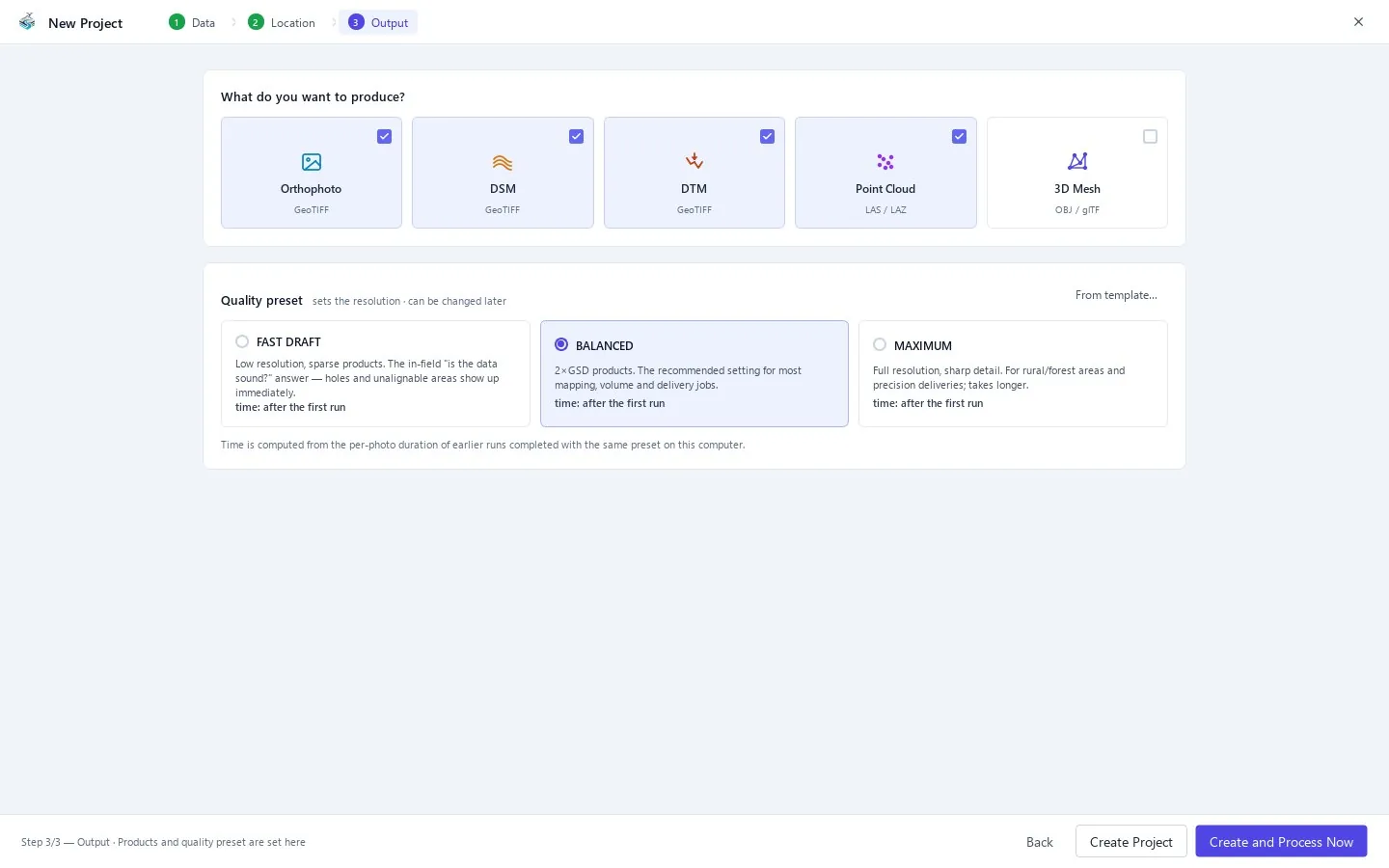
Pick Orthophoto and a preset
Tick Orthophoto in the products list and choose Fast Draft, Balanced or Maximum. Balanced writes the orthophoto at twice the ground sampling distance; Maximum writes it at full resolution.
- 4
Process
Press Create and Process Now, or F5 in the main window. Finished stages are skipped, so a second run after a settings change only redoes what it must.
- 5
Check it
Open the Quality Report (R) for the overlap map and the check-point errors, and view the orthophoto in the main window (key 5) before you deliver it.
- 6
Export the formats you need
Open the Export Center (Ctrl+E) for PNG with a world file, KMZ, MBTiles or tiled GeoTIFF, and for the PDF report.
| Output | Format | Use it for |
|---|---|---|
| Orthophoto | GeoTIFF, lossless, cloud-optimised | GIS, CAD underlay, measurement |
| Preview | JPG | A quick look or an email attachment |
| Image with world file | PNG + .pgw + CRS sidecar | Software that reads a plain image plus a world file |
| Google Earth overlay | KMZ | Sharing without GIS |
| Web and mobile tiles | MBTiles | GIS, web maps, field apps |
| Very large mosaics | Tiled GeoTIFF + VRT | Huge sites that should open as one layer |
| Source map | GeoTIFF + CSV | Auditing which photo supplied each area |
Supported formats
Frequently asked questions
What is the best orthomosaic software for drones?
It depends on what you must deliver. Look for four things: georeferencing you can verify against independent check points, a blend that does not leave ghosts of moving objects, outputs on the same grid as your elevation model, and a report you can hand to a client. Stream Capture is built around those four and runs offline on a Windows PC.
Does it stitch the photos or truly orthorectify them?
It orthorectifies. The photos are aligned with a bundle adjustment, a surface is built from the dense cloud, and each photo is projected onto that surface. Stitching without a surface would leave the geometry distorted by relief.
How accurate is the orthomosaic?
It depends on your camera, overlap, ground sampling distance and control, so Stream Capture measures it instead of assuming it: the quality report gives the error at independent check points.
Can I make an orthomosaic without a dense point cloud?
Yes. The quick-orthophoto mode builds the surface from the sparse alignment cloud and skips the dense stage. It is meant for site checks: relief is coarse and building or tree edges can lean, so it is not a true orthophoto.
What happens to cars and people that moved between photos?
The default blend measures how much the overlapping photos disagree in each cell. Cells that disagree are taken from the best-seeing photo instead of averaged, so moving objects do not leave a half-transparent double image.
Does it work without internet?
Yes. Processing runs entirely on your computer and the photos are never uploaded. The licence also works offline.
Which orthomosaic formats can I export?
GeoTIFF (also as tiled parts with a VRT index), JPG, PNG with a world file, Google Earth KMZ and MBTiles. All are derived from the same lossless orthophoto.
Where this is used
Try Orthomosaic in STREAM
Stream Capture is in development and not released yet. At launch it will come in the same download as its sister program Stream Terrain; today's download contains Stream Terrain.
About Stream Capture