DRONE DATA PROCESSINGComing soon
Drone Image Processing Software for Mapping and Survey Data
Stream Capture takes the photos off your drone's card and turns them into deliverables: orthophoto, DSM, DTM, point cloud, 3D model, contours and a quality report. It checks the data before it starts, runs the whole chain on your GPU, remembers what it has already done and never uploads a pixel.
Stream Capture is in development and not released yet. At launch it will come in the same download as its sister program Stream Terrain; today's download contains Stream Terrain.
What does drone image processing involve?
Drone image processing for mapping is a chain. Read the photos and their positions, find the same points across overlapping photos, solve the camera positions and lens (alignment), build a dense surface, then derive the products from it. Stream Capture runs this as seven named stages — Data, Align, Dense Cloud, Mesh + Texture, DSM, DTM, Orthophoto — and shows each stage's result in the workflow panel.
The same words are used for editing photographs or analysing crops. This page is about survey and mapping processing: photos in, measurable maps and models out.
Drone Image Processing Software in STREAM
It checks the data first
Before heavy work starts, the project scan reads EXIF and XMP, counts RTK-fixed frames, flags blurred frames and missing positions, estimates overlap and draws a coverage map. Broken or half-copied photos are named and left out instead of failing the run late.
Seven stages, one click
Process All (F5) runs every planned stage in order. The play button on a row runs one stage alone, and the checkbox decides whether that product is produced at all.
Only recomputes what changed
Finished stages are cached by content. Change a setting and only the stages it affects run again; pause and resume a job whenever you like.
A persistent job queue
Queue several projects and let them run overnight. If the app is closed or the computer restarts, the queue resumes from the stage where it stopped.
Three quality presets
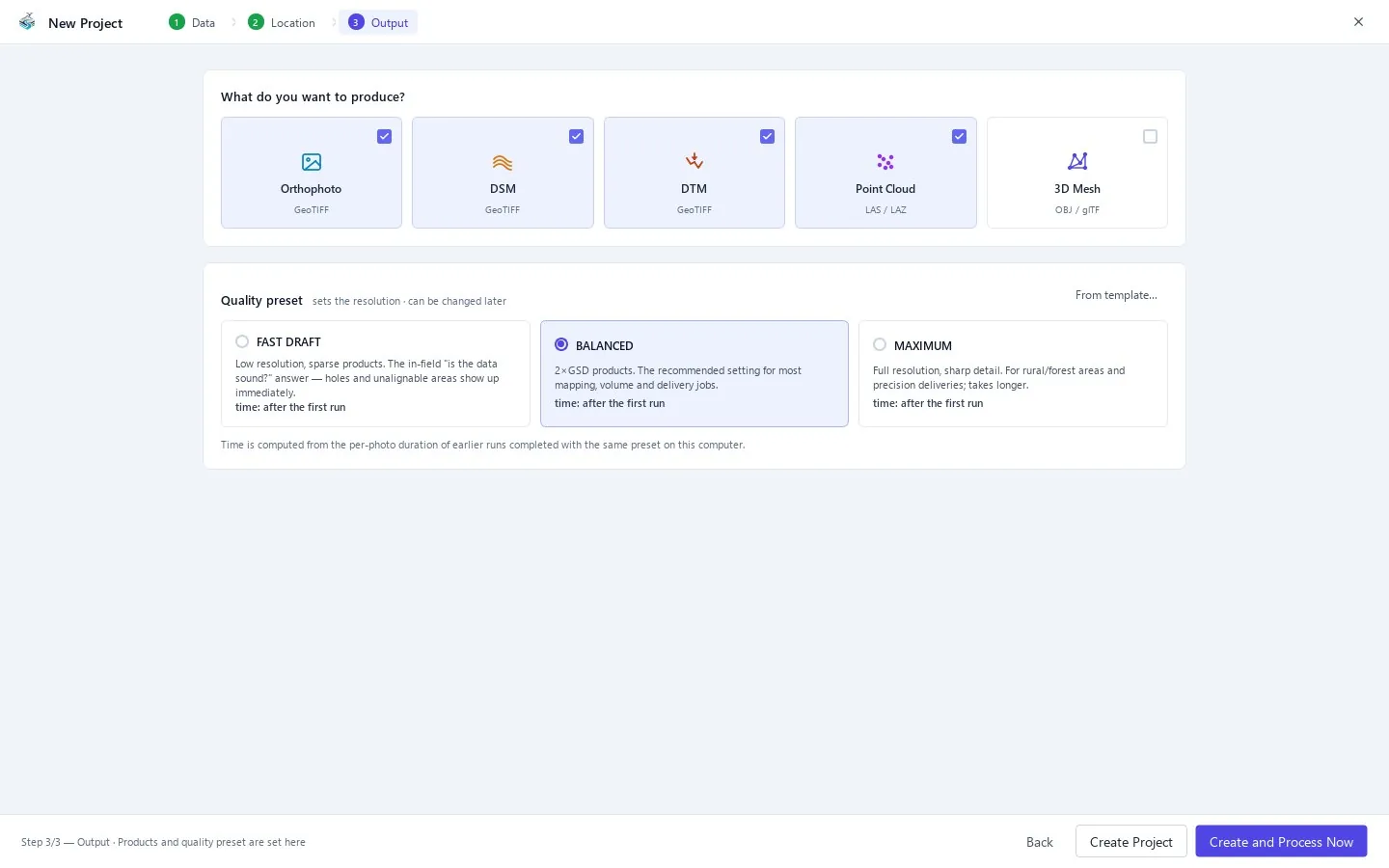
Fast Draft for field checks, Balanced (recommended) for most mapping work, Maximum for full-resolution delivery. The wizard estimates the time from earlier runs on your own machine.
Reproducible results
Same photos, same settings, same output. In our test the product files of two runs were byte-identical apart from time-stamp fields, and a run that was interrupted and resumed produced the same bytes as an uninterrupted one.
Any camera, RTK when it is there
JPEG, TIFF and PNG photos are read with their EXIF and XMP metadata whatever the camera make. The RTK position records that survey drones write beside their photos are used for centimetre-level positions when present.
How to process drone images, start to finish
- 1
Start a project and add the photos
New Project, then add the photo folders. Subfolders are scanned and can be unticked one by one; you do not have to copy photos into a separate folder to process a subset. Source photos are never modified.
- 2
Read the health summary
The live summary shows photo count, camera groups, geotag and RTK ratio, estimated overlap and the coverage map. Fix a problem now, not after an hour of processing.
- 3
Set the location
Confirm the suggested coordinate system and either add a ground control point file or trust the RTK positions.
- 4
Choose products and preset
Tick orthophoto, DSM, DTM, point cloud and 3D mesh as needed, then pick Fast Draft, Balanced or Maximum.
- 5
Process
Create and Process Now. Watch the workflow panel; the engine log opens with F12 if you want detail.
- 6
Review and deliver
Read the Quality Report (R), then use the Export Center (Ctrl+E) for more formats and the PDF report with your company name and logo.
| Stage | What it does | What you get |
|---|---|---|
| Data | Reads photos and positions, checks the data | Camera groups, coverage, health summary |
| Align | Matches photos, solves cameras and lens | Camera poses, sparse cloud, reprojection error |
| Dense Cloud | GPU depth sweep with PatchMatch refinement | Classified point cloud (LAZ) |
| Mesh + Texture | Surface mesh with a multi-view texture atlas | OBJ or GLB model |
| DSM | Rasterises the surface heights | GeoTIFF plus honesty mask |
| DTM | Ground filter, bare earth | GeoTIFF |
| Orthophoto | True-ortho mosaic | GeoTIFF |
Frequently asked questions
What is the best drone data processing software?
Judge it on what it proves, not on what it promises: does it report error against independent check points, does it label the gaps it filled, does it give the same answer twice, and can it run where your data lives. Stream Capture is built to answer yes to each, offline on a Windows PC.
Can I process drone images offline?
Yes. Everything runs on your computer and the photos are never uploaded. The licence works offline as well.
How long does processing take?
It depends on your GPU, photo count and preset. The heavy stages run on the GPU through Vulkan, every stage is cached, and an interrupted job resumes instead of starting over.
How many photos can it handle?
Large projects are handled by splitting alignment into blocks and by out-of-core dense processing that stays within a RAM budget.
Do I need a cloud account or an upload?
No. There is no upload step, no per-project quota and no processing queue on someone else's server.
What does it do after processing?
It writes the products to the project folder and can send them to a Stream Terrain project, which opens the GeoTIFF, LAZ and DXF files directly for volumes, cross-sections and analysis.
Where this is used
Try Drone Image Processing in STREAM
Stream Capture is in development and not released yet. At launch it will come in the same download as its sister program Stream Terrain; today's download contains Stream Terrain.
About Stream Capture