
SOLAR PV
Solar PV Site Suitability and Grading Software
STREAM turns a drone or LiDAR terrain model into a solar-plant site study. It classifies every cell as suitable for PV, suitable after grading or not suitable, checks slope separately for each direction on a single-axis tracker or a fixed-tilt table, counts only the sun the horizon really blocks — and then lays out panel rows and piles on a real graded surface, with cut and fill volumes, a pile table and a CAD surface.
What is PV site suitability analysis?
A solar plant can only be built where the ground lets the structure work: slopes the piles and trackers tolerate, shading from the surrounding relief, and no streams, roads or power lines in the way. Suitability analysis checks those criteria cell by cell and separates ground that is ready from ground that needs earthwork and ground that should be left alone.
Grading is the follow-up question — how much earth has to move to make the rows buildable? STREAM answers it on the same terrain: the design surface under the rows is compared with the ground by the Cut/Fill calculation, so the quantity comes from the surface you analysed, not from a separate tool or a rule of thumb.
To be clear about scope: STREAM works on the ground. It does not lay out inverters, strings or cables, and it does not simulate yield beyond a stated estimate; for yield tools it exports the terrain horizon of any point you pick.
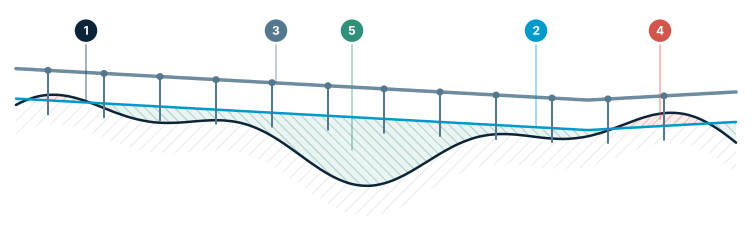
Solar PV row grading — the ground is graded to one profile
Along each row the strip is graded to a single profile within the allowed slope: humps are cut, hollows filled, and the piles follow the line.
- Terrain — the ground as measured
- Graded profile — one profile under the row, within the slope limit
- Row and piles — the panel line at constant height, piles embedded in the ground
- Cut — humps between the piles are removed
- Fill — hollows are filled up to the profile
Solar PV Site Suitability Software in STREAM
Three classes, one map
Every cell is Suitable for PV, Suitable after grading or Not suitable for PV, draped over the terrain as a colour map. PV suitability reason then shows which criterion each cell failed — so you learn why a block is red, not only that it is.
Slope checked by direction
Equator-facing slope, pole-facing slope and cross slope each have their own limit. On fixed-tilt tables a pole-facing slope increases row-to-row shading; on a tracker the slope along the axis strains the pile and drive limits. One average slope number would hide both.
Single-axis tracker or fixed-tilt table
Choose the mounting first. Typical Values fills in typical limits for it from public datasheets as a starting point — check them against your own datasheet. A limit you leave empty switches that criterion off, so the study follows your structure, not a built-in rule.
Shading that terrain aspect cannot inflate
The shading criterion uses the energy that reaches the module plane, so a slope that merely faces away from the sun does not count as loss — only sun blocked by the horizon does. Module shading loss is the result of the same topographic-shadow engine as Sun & Shadow.
Exclusions, buffers and setbacks
Mark streams, roads and power lines as exclusion areas or lines, then set the buffer, the boundary setback, the grading limit and the minimum block area in PV Settings, so the map shows only ground that could really carry a block.
Capacity density and installed capacity
Enter the module power (Wp/m²) and the fixed-tilt row pitch is computed from the slope so rows stay unshaded through the hours you enter at the winter solstice; a tracker uses the row pitch you enter. PV capacity density (MWp/ha) and the installed capacity follow, and with calibrated energy and a performance ratio the period yield (MWh) is stated too.
Row and pile layout
PV Site Grading lays out panel rows in the scope areas. On fixed-tilt structures a row is split into independent tables of the table length. Each line is solved within the allowed slope, with a pile reveal window and a minimum clearance to the ground between the piles — humps in between are cut.
A real graded surface, not a rule of thumb
The strip under each row is graded to a single profile that follows the line: humps between piles are cut, hollows filled, and the cut and fill edges tie into the terrain at the batter you enter. Choose Least earthwork or Balanced (cut = fill); in balanced mode a cut-to-fill ratio from the geotechnical report can be entered.
A watertight mesh with a stated deviation
The design surface is an adaptive, watertight triangle mesh that deviates at most 1 cm from the solved lines (2 cm on very large sites), and the actual deviation is reported — so the volume you quote rests on a surface you can inspect.
Numbers a contractor can price
The summary gives the net volume, the disturbed area, the deepest cut and thickest fill, earthwork per MWp and a drainage warning for depressions on the graded surface that would hold water. The graded elevation at every pile leaves as the Pile Table (CSV).
Back onto the map, and into CAD
Add to Map puts the rows, the piles and the cut/fill map into the project and applies the graded surface to the terrain: in 3D the cut shows as a cut and the fill as a raise, and Profile and Sun & Shadow then use the graded terrain. Hide it in the layer list to get the original ground back. Surface (DXF) saves the design surface for CAD.
Horizon files for yield tools
Export Horizon saves the terrain horizon of the point you pick as a PVsyst (CSV) or PV*SOL (.hor) file, so the shading from the real relief travels into the yield study instead of being re-drawn by hand.
How to check a site for solar PV and grade it
- 1
Load the terrain and mark the site
Open the DEM of the candidate land (or turn a LAS/LAZ cloud into one), set the project coordinate system and draw the areas you want to study.
- 2
Compute Sun & Shadow
Open Analysis ▸ Sun & Shadow and calculate for the scope. The surrounding relief is included, so a ridge beyond the boundary still casts its shadow.
- 3
Switch the display to PV suitability
Set Display to Solar PV suitability, pick Single-axis tracker or Fixed-tilt table, press Typical Values for a starting point and review every limit in PV Settings…
- 4
Read the classes and the reasons
Check the three classes on the map, then use PV suitability reason to see which criterion each failed cell broke. Add exclusion areas and lines for streams, roads and power lines.
- 5
Enter the module power
With the module power in Wp/m² the row pitch, the PV capacity density (MWp/ha) and the installed capacity are computed from the slope.
- 6
Run PV Site Grading…
Choose Least earthwork or Balanced, the batter, the table length and the strip fill, and calculate. The rows, piles and graded surface are solved within the slope limits you set.
- 7
Read the summary and hand it over
Read net volume, disturbed area, deepest cut, thickest fill, earthwork per MWp and the drainage warning. Add the result to the map, export the Pile Table (CSV) and the surface (DXF), and save the horizon for the yield study.
| Criterion | What STREAM checks | What it protects against |
|---|---|---|
| Pole-facing slope (fixed-tilt) | Slope facing away from the equator, against its own limit | Row-to-row shading that grows on such slopes |
| Slope along the axis (tracker) | Slope along the tracker axis, against its own limit | Strain on the pile and drive limits |
| Equator-facing and cross slope | Each against its own limit | One average slope hiding a direction that fails |
| Module shading loss | Energy on the module plane lost to the horizon | Aspect inflating the loss — only blocked sun counts |
| Exclusions and buffer | Streams, roads, power lines and the buffer around them | Blocks placed on ground that cannot be used |
| Boundary setback and minimum block area | Distance to the boundary and the smallest block that counts | Blocks at the edge or in islands too small to hold one |
Supported formats
Frequently asked questions
What does STREAM tell me about a solar site?
It classifies every cell as Suitable for PV, Suitable after grading or Not suitable for PV, shows the criterion each failed cell broke, and gives the PV capacity density in MWp/ha and the installed capacity once you enter the module power. PV Site Grading then lays out rows and piles on a graded surface and reports the earthwork.
Does it design the plant — inverters, strings, cables?
No. STREAM works on the ground: suitability, rows and piles, and earthwork. It does not lay out the electrical system, and its energy is a clear-sky model, relative unless you calibrate it with the site's measured horizontal irradiation. For yield studies it exports the terrain horizon as a PVsyst (CSV) or PV*SOL (.hor) file.
Are the typical slope limits official values?
No. Typical Values fills in typical limits for the chosen mounting from public datasheets so you have somewhere to start. Check them against the datasheet of your own structure — every limit is yours to set, and a limit you leave empty switches that criterion off.
Why is the slope checked by direction?
Because the same slope does different harm in different directions. On fixed-tilt tables a pole-facing slope increases row-to-row shading; on a tracker the slope along the axis strains the pile and drive limits. Equator-facing slope, pole-facing slope and cross slope therefore each have their own limit.
How is the earthwork quantity calculated?
The strip under each row is graded to a single profile that follows the line, and the design surface ties into the terrain at the batter you enter. The cut and fill volumes between that surface and the terrain come from the Cut/Fill calculation and are mapped. The summary gives the net volume, disturbed area, deepest cut, thickest fill and earthwork per MWp.
Can I balance cut and fill?
Yes. Choose Balanced (cut = fill) instead of Least earthwork. If the geotechnical report gives a cut-to-fill ratio, enter it and the balance becomes cut × ratio = fill.
How accurate is the graded surface?
The design surface is an adaptive, watertight triangle mesh that deviates at most 1 cm from the solved lines, 2 cm on very large sites. STREAM reports the actual deviation instead of asking you to trust the limit.
Will I get the pile elevations?
Yes. The graded elevation at every pile is exported as the Pile Table (CSV), and the design surface can be saved as a DXF triangle mesh. A perfectly level row — 0% slope along the row — is allowed.
Does the graded terrain stay in the project?
Add to Map adds the rows, the piles and the cut/fill map and applies the graded surface to the terrain; Profile and Sun & Shadow then work on the graded ground. Hide the layer in the layer list to get the original terrain back.
Is the solar site suitability feature free?
Yes. It is part of the free Windows x64 beta, with every feature unlocked and no separate charge, and everything runs offline on your own computer.
Try Solar PV Site Suitability in STREAM
Free beta for Windows x64. Works fully offline with GeoTIFF, LAS/LAZ and DXF.
Download STREAM free